From prompt engineering to context engineering
Prompt engineering used to be a question about phrasing. You tuned words until the model got the answer right. Context engineering for coding agents replaces that question with a different one that actually governs accuracy in a 20-turn Claude Code or Cursor session, which is what the model is allowed to see across the whole session and what every token of that view costs you downstream.
The shift matters because coding agents do not operate on a single prompt. They run long, tool-heavy loops where every file read, every grep, every pasted doc page accumulates into the context window. That window is no longer small. In 2026 the 200k token context window is the baseline across frontier models, and the 1M-class tier (Claude Opus 4.7, Gemini 3.5 Pro, GPT-5.4) is broadly available. What has not changed is that capacity is not the same thing as quality. A 1M window is not 1M tokens of uniformly reliable attention, and Chroma's context rot research documents exactly that: long-context performance is non-uniform, and accuracy can degrade as input grows longer and noisier well before the advertised ceiling. If you are still thinking about how to phrase your question while your agent is sitting on a hundred thousand tokens of half-relevant file dumps on a 200k window, or several hundred thousand on a 1M window, you are tuning the wrong surface.
This post gives you a concrete framework for the right surface. It names the four places context comes from in a coding session, shows what each one actually costs, and gives you four rules that change outcomes rather than feelings.
The five context surfaces in a coding session
Generic context engineering posts like philschmid's guide or the PromptingGuide context engineering guide discuss context at a more general level. For coding agents, it helps to break the session into five distinct surfaces, each with a different owner and a different failure mode.
1. The system prompt and agent harness
This is what your tool injects before you ever type. Claude Code, Cursor, and Codex each bake in their own instructions, tool definitions, and formatting rules, and Anthropic's Claude Code best practices docs expose some of the operational guidance around how that environment uses context and tools. You usually do not tune this surface directly, because the vendor already does.
2. Conversation history
Every user message and every assistant response stays in the window by default, so after ten turns you are carrying ten turns of back-and-forth even when only the last one matters. This surface grows monotonically unless you cut it.
3. Tool outputs
File reads, bash stdout, grep hits, and web fetches all land here, and this is the surface most engineers underestimate. A single ls -R on a medium repo, or a full-file read of a 2000-line module, can easily dwarf everything else in the window.
4. Retrieved docs
This is external knowledge the agent pulls in on demand, like API references, SDK docs, and internal wikis. The failure mode here runs opposite to the others, because retrieval is the one surface where you have a real lever, and you can choose between a compact local index returning 300 tokens or a full-page paste spending 60k.
5. Persistent agent memory
This is the surface most engineers do not think about at all, because it is largely invisible. Claude Code, Codex, Cursor, Windsurf, Cline, and most modern coding agents write memory to disk automatically: project decisions, recurring patterns, things you have explicitly told them to remember. That memory is per-agent and per-silo. When you switch tools, or start a new session, it is gone.
The reason this matters for context engineering is that the cost of missing persistent memory is not measured in tokens, it is measured in re-explanation. You tell Claude Code how your auth system works in session 3. You start a new Codex session in week 4. You spend the first ten turns re-establishing the same context. That is not a context window problem; it is a memory silo problem, and the fix is different. Harvesting all of your agents' memory into a single queryable local index and injecting a consolidated snapshot into the always-loaded instruction file closes the silo at its root rather than patching it session by session.
What each surface actually costs
Numbers beat intuition. Here is one representative token budget from an internal Claude Code debugging session at turn 20. Treat it as an example of how the surfaces can grow, not as a universal baseline. A turn-20 session of this shape uses roughly 30% of a 200k window and closer to 6% of a 1M Opus 4.7 window, so read the claims below in proportional terms rather than as a fixed alarm level.
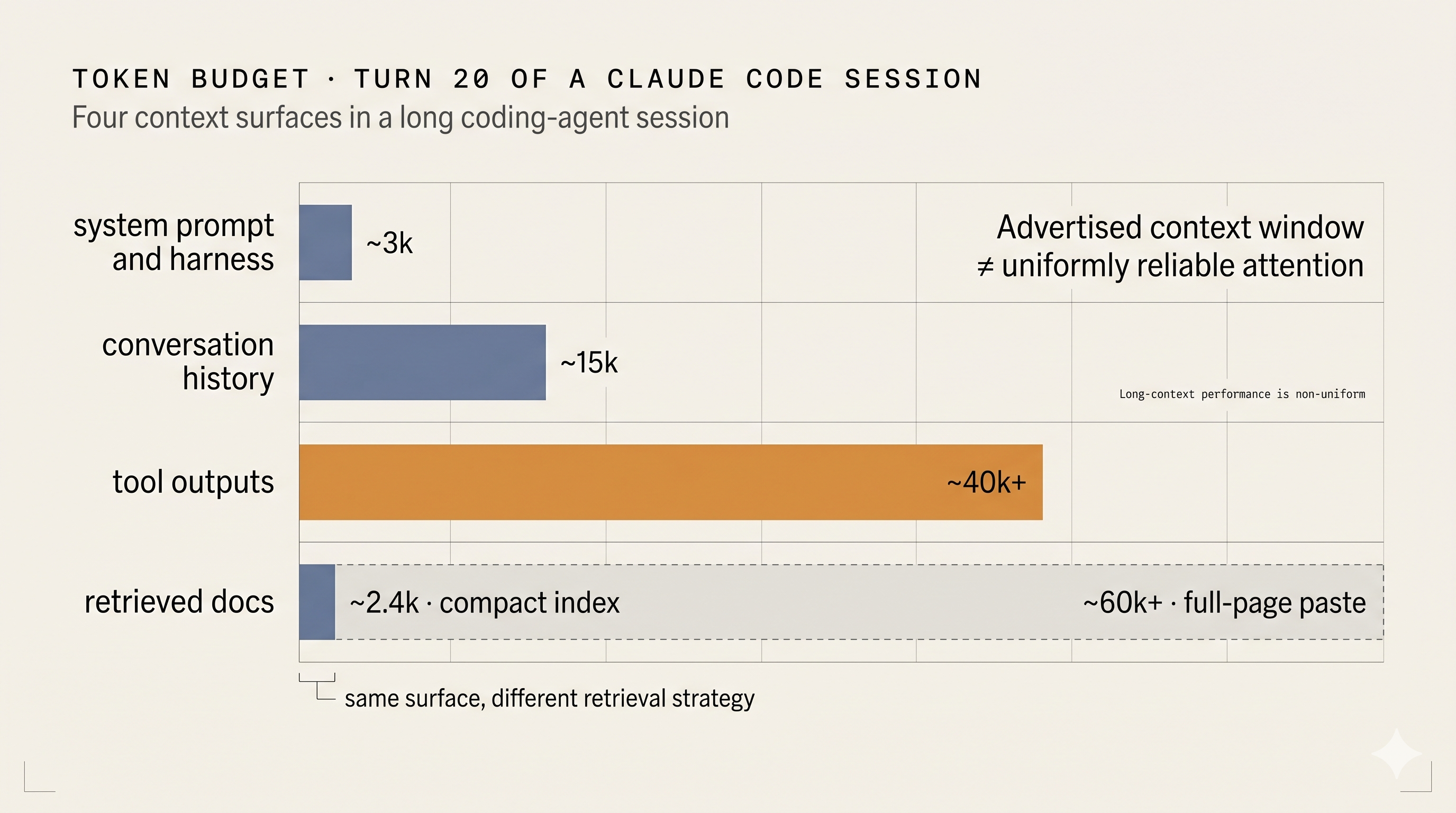
| Surface | Typical tokens at turn 20 | Who controls it |
|---|---|---|
| System prompt and harness | ~3,000 | The vendor |
| Conversation history | ~15,000 | You, via resets and tighter session boundaries |
| Tool outputs | ~40,000 and climbing | You, via which tools you run |
| Retrieved docs (compact index) | ~2,400 | You, via retrieval strategy |
| Retrieved docs (full-page paste) | ~60,000+ | You, same lever used badly |
| Persistent memory (consolidated) | ~1,000-2,000 | You, via harvest and apply |
Two observations follow from this table. First, tool outputs are typically the largest single surface in long sessions, and they are the one engineers pay the least attention to. On a 200k window that share is already the piece most likely to push your proportional fill into the range where retrieval and synthesis quality start to suffer, and even on a 1M window the same class of noise compounds across turns rather than shrinking as the window grows. A single read of an unfiltered log file or a recursive directory listing can cost more than a surprising amount of prompt tweaking can save. Second, retrieved docs are bimodal, because the same surface is either the cheapest or the most expensive thing in the window, depending entirely on whether you paste or you query. The persistent memory row is small precisely because it is a curated snapshot, not a raw dump of everything your agents ever wrote.
The framework: five rules for coding agents
These are the agentic coding best practices that actually move the accuracy needle, ordered by leverage.
Rule 1. Prune conversation history aggressively. Treat /clear as a first-class tool, not an emergency brake. The smell is not turn count on its own, because a focused 40-turn session on one feature is fine even on a 200k window. The smell is topic drift: a single session that spans three unrelated features accumulates history that no future turn will ever need, and that dead weight is exactly what context rot studies show degrading later answers. Clear the session at logical task boundaries. If you find yourself re-explaining context to the model mid-session because it has drifted, the fix is almost always a clean slate plus a short written handoff, not a longer prompt.
Rule 2. Tool outputs belong in short-lived subagents. When the next step is read-heavy exploration (grepping a large codebase, walking a directory tree, dumping a migration), dispatch a subagent. The subagent burns its own window on raw output and returns a summary to the main thread. Your main context keeps the summary, not the 30,000 tokens of grep hits that produced it. The point is not that 30k is catastrophic on its own, because on a 200k or 1M window it plainly is not. The point is that noise scales with turns, and subagents keep the main thread signal-dense across a long session, which matters more than any single tool call's raw size.
Rule 3. Retrieved docs come from a compact local index, never a full-page paste. Pasting a large pytest or FastAPI doc page into the context is one of the most common unforced errors in coding agent workflows. A compact retrieval layer returns only the relevant sections within a token budget. In docmancer, section-level results often land in the low hundreds of tokens instead of forcing an agent to absorb page-scale context. A 1M window does not rescue you here, because pasting 60k tokens when you actually needed 300 trades signal for noise at any scale, and the model's effective attention on the relevant sections shrinks accordingly.
Rule 4. Consolidate persistent memory across your agents. If you use more than one coding agent, each one is writing memory to a different location on disk, and none of them can read what the others wrote. The practical consequence is that you re-explain the same architectural decisions, the same conventions, and the same past choices every time you switch tools. The fix is not to pick one agent and only use that, but to harvest all of the memory files they have already written, consolidate the signal, and inject it into the always-loaded instruction file for each agent. That way every new session starts with the accumulated context from all of them, not just the current one.
Rule 5. Do not start by tuning the system prompt. Vendors iterate on the harness constantly, and their telemetry dwarfs yours. In vendor-managed coding agents, your leverage usually lives in the four surfaces above. If you feel the urge to rewrite a tool description because "the model keeps misusing it," check first whether the model is actually misusing it or whether your conversation history has rotted past the point where any description would survive.
Inspect before you tune
The reason this framework is different from the usual context engineering vs prompt engineering essay is that each rule above leaves observable evidence in your workflow. Before you rewrite a single prompt or reach for a larger model, inspect what your agent will actually see:
docmancer add https://docs.pytest.org
docmancer inspect
docmancer query "parametrize fixture scope"
For docs: if the query returns the wrong sections, prompt tuning is unlikely to rescue the workflow. If the query returns the right sections and the agent is still wrong, the problem is more likely to be context window management, task framing, or answer synthesis than raw retrieval.
For memory: inspect what your agents have already written down before assuming they have forgotten it.
docmancer memory sync
docmancer memory sources
docmancer memory query "what did we decide about the database schema?"
If the answer is in the index, the agent was not forgetting, it just was not given the context. That is a different fix than re-explaining in the prompt.
Agentic coding best practices, at a glance
If you skimmed this far, here is the whole framework in eight lines.
- Think in five surfaces: system prompt, conversation history, tool outputs, retrieved docs, persistent memory.
- Your leverage is in the last four. The vendor owns the first.
- Tool outputs are the largest and noisiest surface over long sessions. Move read-heavy work into subagents that return summaries.
- Clear the session at task boundaries. Long sessions are not a virtue.
- Retrieve docs from a compact local index. A full-page paste is almost always wrong.
- Consolidate memory across agents. Each coding tool you use writes to its own silo; harvest all of them.
- Inspect both the indexed docs and the indexed memory before you tune prompts.
- If you never check the context your agent receives, you are cargo-culting.
Run this yourself
The full setup is a handful of commands:
pipx install docmancer --python python3.13
docmancer setup --agent claude-code --agent codex
docmancer add https://docs.pytest.org
docmancer memory sync
docmancer memory query "what did we decide about the database schema?"
docmancer query "parametrize fixture scope"
The getting started guide walks through the same path in more detail. The companion post on cross-agent memory consolidation covers the memory harvest and Mistral consolidation flow end to end. Context engineering for coding agents is not a new discipline. It is the discipline you were already doing informally every time you cleared a session or trimmed a paste. The only difference is that now you can measure it, and you can harvest it.